
Basics
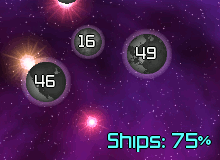
| 1. Left click to select a planet. | 2. Mouse wheel to change % Ships. |
|---|---|
 | 
|
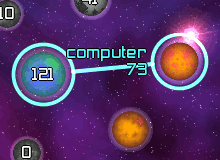
| 3. Right click to send ships. | 4. Watch your fleet take over! |
 | 
|
The number on the planet is the number of ships on that planet. The size of the planet indicates its production. You can mouse-over planets to see the stats. Try the in-game tutorial to learn all the other controls.
Game Controls
| Action | Result |
|---|---|
| Left Click | Select an item. Either a planet or a fleet. |
| Right Click | Choose the destination planet and send the fleets. |
| Mouse Wheel | Adjust the % Ships |
| Numeric Keypad | Adjust the % Ships |
| Left Click - Drag and Drop | Select an item and drag and drop to the destination planet and send the fleets. |
| Shift-Left Click | Select all your planets |
| Ctrl-Left Click | Select/deselect additional items. |
| Drag a Box | Select planets. |
| F4 | Take a screenshot. By default it saves the image to your desktop. You can change that in the options. Images are named like "galcon001.bmp" etc. |
Net Commands
During the net game, there are a number of actions you can perform that are not on the menus. They are available as /slash commands to reduce the amount of buttons on the screen. A $var is an option you can pass to the command.
To run a net game yourself, set your router to forward port 9031 to the computer you are going to host a game on.
| Command | Result |
|---|---|
| /join $team | Join or create a team. |
| /leave | Leave the team you are in. |
| /action, /me | Perform an action, for example if your name is "phil" and you type "/action walks his goat." the other players would see "*** phil walks his goat." |
| /status $status | Change your status. Valid values are "play" and "away". Shortcuts are /play and /away. |
| /color $color | Change your color. Valid color names are: red, green, blue, yellow, cyan, purple, orange, white, pink, mint, periwinkle, and salmon. Short cuts are /red, /green, /blue, etc... |
| /surrender | Surrender (all your planets turn neutral.) |
| /who | List players on server. |
| $user | If you type a user's name within a message a notification beep will sound on their system. |
| /msg $user $msg | Send a private message (PM) to another user. /m is a shortcut. |
| ...[tab] | Tab-completion of terms. Say you want to type in "bilgewarriors" nick name. Just type "bil" then hit the [tab] key. Galcon will do the rest for you. Works with commands too - "/sur"+[tab] = "/surrender". |
Admin Commands
When you run the server, you call the shots. Here are the special commands you have available.
| Command | Result |
|---|---|
| /reset | Reset the wins counts. |
| /abort | Abort an in-progress game. Wins are not counted. |
| /stop | Stop an in-progress game. Wins are counted based on who has the most planets. |
| /dissolve | Dissolve all teams. |
| /dissolve $team | Dissolve a team. |
| /team $team $user $user ... | Create a team and put the players into it. |
| /status $status $user $user ... | Change the users status. |
| /strict | Switch the server into strict mode. (Disallows users from changing options, joining teams, starting games.) |
| /deny $command | Deny the ability to do a command. For example "/deny start" would only allow the admins to start a round. "/deny options" would only allow the admins to change the options. |
| /allow $command | Allow a previously denied command. |
| /perms | List the current permission settings. (strict mode, denied commands) |
| /admin $user | Grant a user admin. * |
| /unadmin $user | Revoke a user admin. * |
| /adminlist | List the admin users. |
| /mute $user | Mute a user. |
| /unmute $user | Unmute a user. |
| /mutelist | List the muted users. |
| /kick $user | Kick a user off your server. |
| /ban $user | Ban a user from your server. |
| /banip $user | Ban a user and their IP block from your server. |
| /unban $user | Unban a user from your server. |
| /banlist | List the banned users. |
| /desc $description | Change the description of this game on the game list screen. |
| /topic $topic | Change the topic as displayed at the bottom of the waiting screen. |
| /ranks 123456 | Change which ranks are allowed to play on this server. 1 is Admiral ... 6 is Cabin Boy. |
* these commands are available only to the owner of the server. Other commands like /kick, /ban, /banip cannot be used against admin users.
Running a "Headless" Host
You can host a server within the Galcon interface. However, sometimes it can be nice to be able to run a server without running the whole game. Note the name and passwd supplied are generally your login user name and passwd.
Under linux:
cd galcon
./galcon server -name $name -passwd $passwd
Under windows click Start->Run->Type "cmd"
cd "C:\Program Files\Galcon"
main server -name $name -passwd $passwd
Under MacOSX run Utilities/Terminal:
cd /Applications/Galcon.app/Contents/MacOS
./galcon server -name $name -passwd $passwd
Additional options:
| Option | Results |
|---|---|
| -gtitle "My Server" | Set the title |
| -gpasswd password | Set the password |
| -gtopic "Welcome..." | Set the topic |
| -granks 12345 | Set the allowed ranks |
| -nosound | Disable sound effects |